Pages - Browsing Software
-
ChapterDb.org
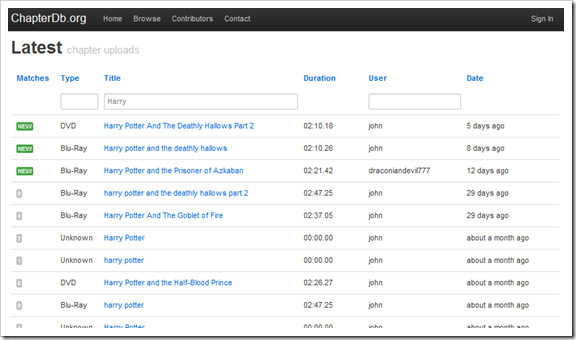
For years I've maintained the ChapterGrabber application that can extract chapters from Bluray, DVD, and HD-DVD so it can apply names to each chapter. Since version 4.2, I incorporated a database into the application to compliment the TagChimp database. Over time the database has grown and there are now over 31,000 chapter sets and over 612,000 individual chapters.
Current Stats
As of 2011-12-23 11:10 AM
Type Count DVD 14865 Blu-Ray 10688 HD-DVD 103 Other 5497 Total 31153 Previously, the only way to access all this useful information was the ChapterGrabber application. With a website, more users can access the data and eventually maintain the data.
Introducing ChapterDb.org
Although the website is under early development, you can already search for chapters and see top contributors.
The following future enhancements are planned:
- Cleanup and combine duplicates
- Better API support
- IMDb and TMDb integration
- Star high quality chapter set
- Flag low quality chapter set
- Download support in multiple formats
- Better searching
Please let me know if you have any questions or suggestions on twitter @jarrettv
-
Bitrate Calculator
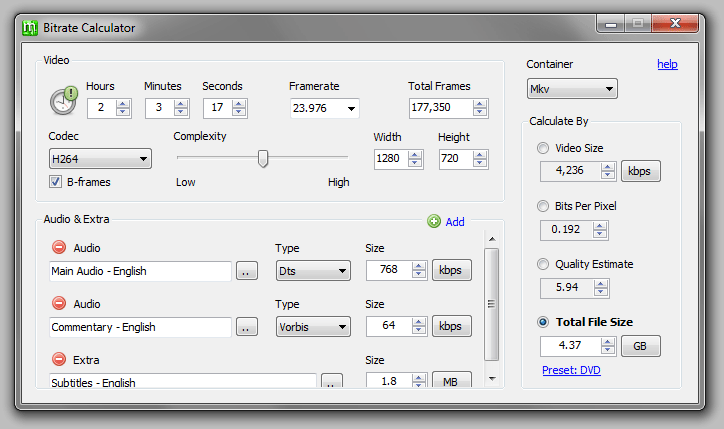
This calculator is useful for finding appropriate bitrates for encoding video and audio. It is very similar to the popular calculator in MeGUI but has been updated to work standalone.
Bitrate Calculator is built with and requires the .NET 3.5 Client Profile.
Download
View source code on GitHub
Version History
- Version 0.5: 2010/05/18
- The first beta version with known issues (no presets, etc).
How To
Please see MeGUI wiki bitrate calculator page.
Credits
Code adapted from MeGUI
-
SimpleUpdater as a ClickOnce Alternative
About
I recently evaluated ClickOnce as a technology for keeping an application updated. It worked as expected and was quick to implement because of the built-in support within Visual Studio. However, the following issues kept me from using it:
- ClickOnce application is not a normal application with a simple executable
- ClickOnce application does not accept normal command-line arguments
- ClickOnce application must be installed using a special application link
- ClickOnce application requires special mime-types in IIS
- ClickOnce application has slow startup when checking for updates
So I liked the ClickOnce update story but I hated that a ClickOnce application is special. So, I created an extremely simple updater with the goal of having the least code possible. My simple updater does the following:
- SimpleUpdater can check for updates at startup (in a separate thread for speed) or anytime on demand
- SimpleUpdater downloads very simple remote XML manifest
- SimpleUpdater will prompt user when there is an update available
- SimpleUpdater downloads and extracts updated files and restarts updated application
SimpleUpdater is built with and requires the .NET 3.5 Client Profile.
Implementation Overview
- Add Updater.exe to your project
- Add Updater.cs code to your project
- Add UpdateForm to your project
- Call CheckForUpdates upon startup
- Add ShowUpdateDialog code to your main form
- (optional) Add manual check for update option to your main form
- Create and upload manifest and update zip to server
Implementation Details
Update: I've added an example client app to the github
Step 1: Add Updater.exe to your project
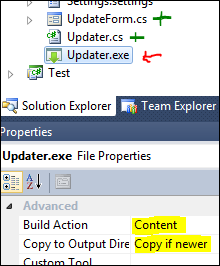
Add the Updater.exe to your project and set build output to content and copy to output directory to copy if newer. The Updater.exe becomes another file that is deployed with your application.
Step 2: Add Updater.cs and UpdateForm to your project
Copy these files into your project. The UpdateForm is so simple that if you need to rewrite in XAML it should only take a few minutes. Feel free to change the naming and namespaces to simplify things.
Also, add the following settings to your project (or hard-code if you like):
Step 3: Add startup code
Upon startup, usually in your Program.cs Main() method, call Updater.UpdateUpdater() to check for a new Updater.exe file. Since the Updater.exe file was locked during update, the client app must rename the file.
Next, in your main form's load event, use a thread to call Updater.CheckForUpdates().
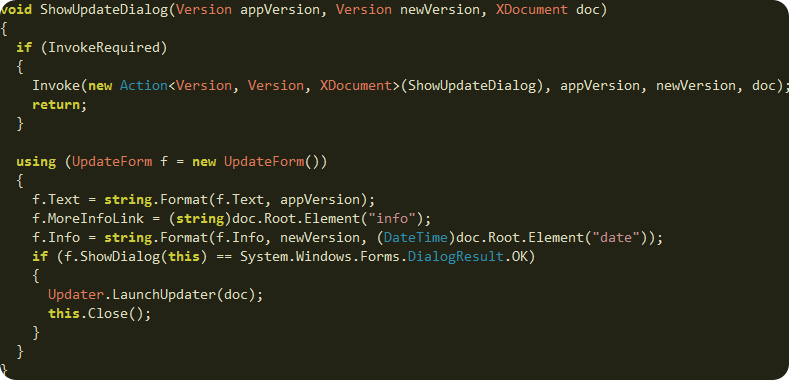
Step 4: Add ShowUpdateDialog method to your main form
This code will extract the update details from the manifest document and show the UpdateForm as a dialog.
Step 5: (optional) Add manual check for update
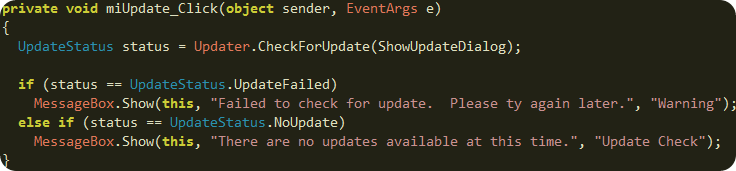
If the user does a manual check from the help menu, you may want to display a message box with the result. Use this code:
Step 6: Create a manifest file
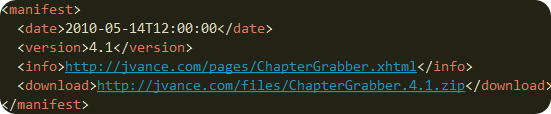
The App.manifest is extremely simple. It contains the update date, version, and links:
I recommend you add this file to your project and set "build output" to "content" and "copy to output directory" to "copy if newer". Also, you can either automate the update of this file with each build or update it manually. Each time you want to deploy an update, update the assembly version and update this manifest file.
Step 7: Deploy the update
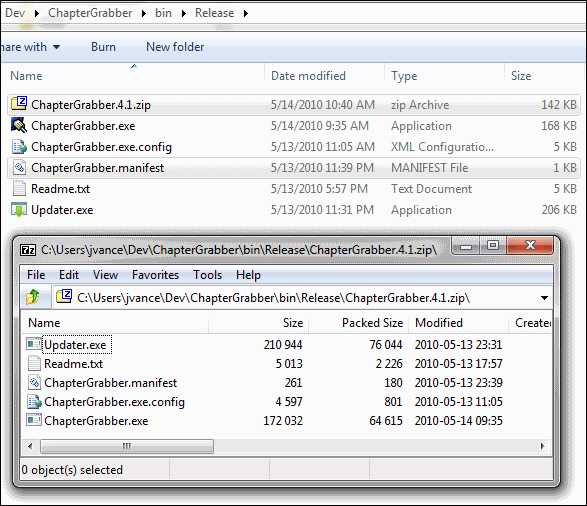
Build your application and create a zip of the release files. Copy the zip file and the manifest file to your server.
Simple Updater Source Code
I've put the simple updater source code on GitHub. The updater application includes some code from the SharpZipLib for unzipping files. Otherwise, the code is pretty simple. I wrote around 200 lines of code for the updater application.
Credits
- SharpZipLib
- famfamfam icons
-
jQuery Month Calendar Plugin
The jQuery Month Calendar Plugin is a free plugin to add a small and fast calendar navigation widget to your web page. I used the jQuery Calendar Widget Plugin as inspiration to create a light-weight calendar that is also interactive.
Features
- Jump between months without needing to reload page
- Events for changing date or each day can be a link
- Supports templated day links
- Change date can be canceled
- Uses clean semantic markup
- Degrades gracefully when javascript disabled
- Very small at only 2KB
HTML
The following HTML is generated server side. I consider it the fallback code if the client does not have javascript enabled. I use ASP.Net MVC to generate it but you can use PHP, etc.
<div class="cal">

<a rel="prev" href="/jvance/2010/01/02">Prev</a>
<a rel="next" href="/jvance/2010/03/02">Next</a>
<h3 class="month">February 2010</h3>
<table cellspacing="0">
<thead>
  <tr><th class="weekend">Sun</th><th>Mon</th><th>Tue</th><th>Wed</th><th>Thu</th><th>Fri</th><th class="weekend">Sat</th></tr>
</thead>
<tbody>
  <tr><td class="weekend out"><a href="#/jvance/2010/01/31">31</a></td><td><a href="#/jvance/2010/02/01">1</a></td><td class="current"><a href="#/jvance/2010/02/02">2</a></td><td><a href="#/jvance/2010/02/03">3</a></td><td class="today"><a href="#/jvance/2010/02/04">4</a></td><td><a href="#/jvance/2010/02/05">5</a></td><td class="weekend"><a href="#/jvance/2010/02/06">6</a></td></tr><tr><td class="weekend"><a href="#/jvance/2010/02/07">7</a></td><td><a href="#/jvance/2010/02/08">8</a></td><td><a href="#/jvance/2010/02/09">9</a></td><td><a href="#/jvance/2010/02/10">10</a></td><td><a href="#/jvance/2010/02/11">11</a></td><td><a href="#/jvance/2010/02/12">12</a></td><td class="weekend"><a href="#/jvance/2010/02/13">13</a></td></tr><tr><td class="weekend"><a href="#/jvance/2010/02/14">14</a></td><td><a href="#/jvance/2010/02/15">15</a></td><td><a href="#/jvance/2010/02/16">16</a></td><td><a href="#/jvance/2010/02/17">17</a></td><td><a href="#/jvance/2010/02/18">18</a></td><td><a href="#/jvance/2010/02/19">19</a></td><td class="weekend"><a href="#/jvance/2010/02/20">20</a></td></tr><tr><td class="weekend"><a href="#/jvance/2010/02/21">21</a></td><td><a href="#/jvance/2010/02/22">22</a></td><td><a href="#/jvance/2010/02/23">23</a></td><td><a href="#/jvance/2010/02/24">24</a></td><td><a href="#/jvance/2010/02/25">25</a></td><td><a href="#/jvance/2010/02/26">26</a></td><td class="weekend"><a href="#/jvance/2010/02/27">27</a></td></tr><tr><td class="weekend"><a href="#/jvance/2010/02/28">28</a></td><td class="out"><a href="#/jvance/2010/03/01">1</a></td><td class="out"><a href="#/jvance/2010/03/02">2</a></td><td class="out"><a href="#/jvance/2010/03/03">3</a></td><td class="out"><a href="#/jvance/2010/03/04">4</a></td><td class="out"><a href="#/jvance/2010/03/05">5</a></td><td class="weekend out"><a href="#/jvance/2010/03/06">6</a></td></tr><tr><td class="weekend out"><a href="#/jvance/2010/03/07">7</a></td><td class="out"><a href="#/jvance/2010/03/08">8</a></td><td class="out"><a href="#/jvance/2010/03/09">9</a></td><td class="out"><a href="#/jvance/2010/03/10">10</a></td><td class="out"><a href="#/jvance/2010/03/11">11</a></td><td class="out"><a href="#/jvance/2010/03/12">12</a></td><td class="weekend out"><a href="#/jvance/2010/03/13">13</a></td></tr>
</tbody>
</table>
<a rel="today" href="#/jvance/2010/02/04"><small>go to</small> Today</a>
</div>
CSS
The following CSS makes it look pretty. There are also some tricks going on with the icons to minimize the number of image files downloaded. It is called CSS sprites. I've tweaked it to look good in all the major browsers.
.cal {text-align:center; width:24em;-moz-border-radius:8px; -webkit-border-radius:8px;background:#fafafa;
                  border: solid 1px #ddd; margin:0; padding:0.8em}
.cal .month {color:#002a5f; font-weight:bold; margin:0.2em 0; padding:0.4em; font-size:1.5em; text-align:center }
.cal a[rel=prev], a[rel=next] { display:block; margin:0.3em 1em; overflow:hidden; width:32px; height:32px;text-indent:-999em;background: transparent url('img/icons.png') no-repeat scroll 0 0 }
.cal a {text-decoration:none}
.cal a[rel=next] {float:left;background-position: -32px -32px}
.cal a[rel=prev] {float:right;background-position: 0 -32px}
.cal a[rel=next]:hover {background-position: -32px 0}
.cal a[rel=prev]:hover {background-position: 0 0}
.cal table {background:#fbfbfb;width:100%;margin:0 0 0.5em 0;padding:0;border: solid thin #f2f2f2; border-collapse: separate !important}
.cal td, .cal th {width:14.3%;height:2.3em;border: solid thin #ddd; padding:0 }
.cal tbody td {text-align:center; vertical-align:middle;}
.cal tbody a {display:block;width:100%;line-height:280%}
.cal td.out {background:#f8f8f8; font-family:Arial Narrow } .cal td.out a { color:#aaa}
.cal .weekend {background:#f2f2f2}
.cal .weekend.out {background:#f0f0f0}
.cal td.current {font-weight:bold;padding:0;background: #8de !important} .cal td.current a{color:#002a5f;}
.cal td.hover, .cal td.weekend.out.hover {color:#224cff;background:#ff8;cursor:pointer}
.cal td.today {font-weight:bold; border:solid 1px red} .cal td.today a, .cal a[rel=today]{color:Red}
Javascript
The following javascript is used on the demo page to configure three different calendars. You can configure:
- Custom javascript event when day is clicked
- Custom start month and date
- Custom date URL using a URL template
$().ready(function () {
  $("#cal-event").calendar({ dateChanged: function (date) { alert('You clicked a ' + date.toDateString()); return false; } });
  $("#cal-cust").calendar({ year: 2008, month: 3, current: new Date(2008, 3, 2) });
  $("#cal-url").calendar({ templateUrl: '/blog/year-month-day.php' });
});
Don't forget, you'll need to import jquery.js and the jquery.calendar-1.0.js scripts in your page.
-
jQuery Rater Plugin
Please see New jQuery Rater Plugin for Star Ratings
-
jQuery OpenID Plug-in
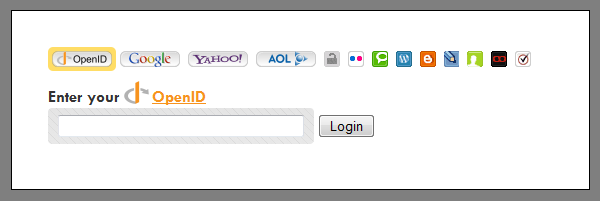
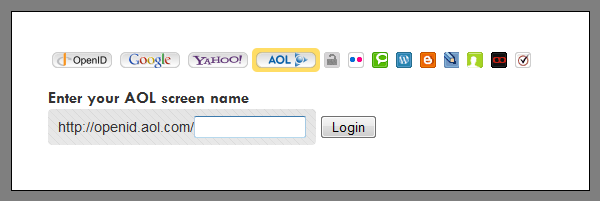
The jQuery OpenID Plugin is a free plugin to add easy login support for the most popular OpenID RP's such as Google, Yahoo, AOL, and more. The inspiration for this plugin is based on openid-selector, openid-realselector, and ID Selector. This selector is different because it does not hide the markup details in javascript. Therefore, you can easily add new providers or rearrange the existing ones without digging into the javascript. The login form will still work for normal OpenID logins if javascript is disabled (see screenshot).
The plugin defaults to the first provider in the list which in the above case is a normal OpenID login box. There are two other types of providers, direct providers and username providers. A direct provider does not require any input and will automatically direct you to the provider login page. A user provider assists in building your OpenID URL. For example, Google and Yahoo are direct providers and AOL is a username provider that asks for the screen name. The other providers, such as myOpenID and flickr are also username providers. Clicking each icon will alter the OpenID URL that you are building.
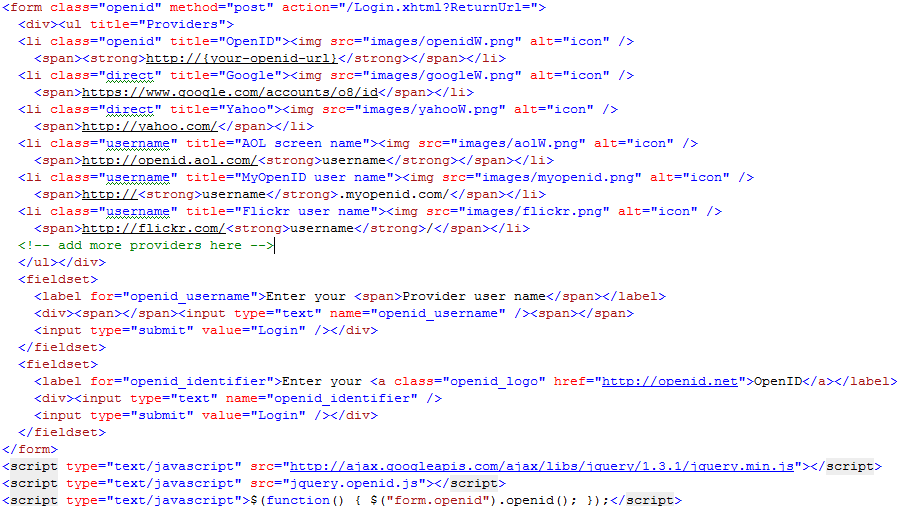
The HTML for the above form is simple. There is a list of providers and then two inputs to support either the OpenID provider or the username provider (denoted by the class type). Each item in the list denotes the OpenID endpoint . For the username providers, the keyword "username" is replaced by the value input into the openid_username textbox. You can add new providers by adding them to the list. Also note the javascript call to activate the plugin at the bottom.
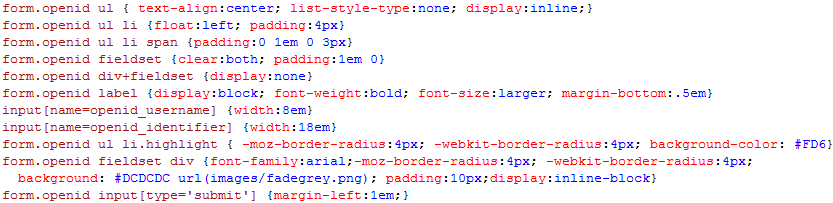
The CSS (shown below) floats the items in the list so they appear inline. The highlight class shows which item is selected. The first fieldset defaults to hidden.
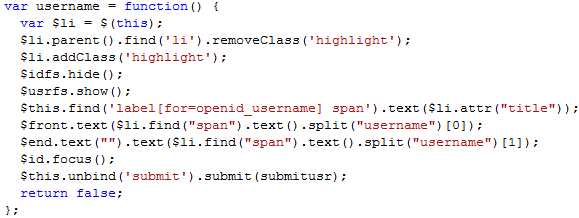
The plugin works by attaching a different click event to each type of provider. For example, the below javascript sets up the username provider.
The whole plugin is very light weight at only 2.5KB javascript (not minified or compressed), 1KB CSS, and 3KB for the HTML.
Download the plugin (js + css + html + images)
License update: You may freely use the code in accordance with the Creative Commons Attribution License.
Provider Listing
Here is a listing of providers that you can use to customize your plugin . Just view the source and copy and paste the <li> into your list . Some providers have multiple icons to choose from so just keep the image you like best.
 http://{your-openid-url}
 https://www.google.com/accounts/o8/id
 http://yahoo.com/
 http://openid.aol.com/ username
 http://username.myopenid.com/
 http://flickr.com/ username/
 http://technorati.com/people/technorati/ username/
 http://username.wordpress.com
 http://username.blogspot.com/
 http:// username.livejournal.com
 http://claimid.com/ username
 http://username.myvidoop.com/
 http://username.pip.verisignlabs.com/
 http://{endpoint not yet released}
 http://www.myspace.com/username
Additional Images










If you have added providers not listed here, please let me know so I can add them. If you want to create new wide icons, you can download the Paint.Net pdn file here: OpenId.pdn (zipped 51 KB).
-
Chapter Grabber
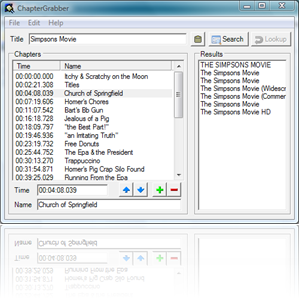
ChapterGrabber will extract chapter times from DVD, HD-DVD, and BluRay discs and combine them with chapter names from the internet. It produces chapter text that are useful when muxing ogg media and matroska files. It is particularly useful for those who like to convert their movies to a portable format for on the go watching.
Install
You must have .NET Framework 3.5 available from WindowsUpdate.
Whats New?
2013-02-17 : New versions at ChapterDb.org
2011-12-23 : v5.2
Small bugfixes to database and searches
Added link to new database website... missing history ...
2010-06-04 : v4.4
Queue search so interface stays responsive (add wait indicator)
Add new support for choosing correct title with help of Google
Title indictor for when good title chosen2010-06-04 : v4.3
Queue database work to keep from slowing UI down
Show animation while waiting on database work
Fix import from clipboard for chapters copied from spun website2010-06-03 : v4.2
Added new online database support from chapterdb.org
Names automatically loaded when found in database
Database automatically updated upon save2010-05-14 : v4.1
Added automatic application updater that downloads and installs new updates2010-05-13 : v4.0
Added update-checking and auto notification
Added chapters file association2010-05-10 : v3.9
Update TagChimpGrabber to specify type of movie2010-05-09 : v3.8
Removed MetaGrabber
Fixed TagChimpGrabber2009-05-01 : v3.7
Attempt to fix globalization issues for non-US cultures
Source code included download2010-01-25 : Source Code
I have released the source code on google code!2009-01-23 : v3.6
HD-DVD support added. You can now extract chapters from the disc or directly from an XPL file.
4 new output formats added: TsMuxeR Meta, Timecodes, Celltimes, x264 QP File.
You can now change current FPS without recalculating chapter times.2009-01-09 : v3.5
New source for chapter names can now be grabbed from metaservices.
ChapterGrabber now stores last open directory in settings and points to parent directory when it doesn't exist.2008-12-19 : v3.4
ChapterGrabber can now detect the fps of BluRay discs via the CLIPINFO data. However, it does not yet support extracting the fps when directly opening a MPLS file.
The new ChapterGrabber format has been finalized and can be properly loaded and saved.
When moving the chapters up or down, only the names are moved and not the times.
I also added some additional framerates to the config file, 50fps and 60/1.001fps.2008-12-06 : v3.3
Two new output formats added: Matroska XML and ChapterGrabber XML formats (no support yet for loading these files). You can now choose a language to apply to all chapter names through a new menu. ChapterGrabber now detects and removes invalid characters in the tagChimp search results.2008-12-03 : v3.2
IFO parsing was re-written with increased accuracy. It also no longer depends on vStrip.dll for IFO parsing. You can now change the FPS of your chapters in case you do a pulldown or want to switch chapter times from NTSC to PAL. A new menu for recently opened files is now available. Please note that Bluray FPS is not yet detected. A new configuration file stores user and app settings.2008-11-25 : v3.1
New support for reading chapters directly from BluRay discs. Also, IFO parsing was optimized and you can now read chapters directly from DVD discs without having to choose the IFO file. A new setting allows you to ignore the short last chapter that sometimes occur at the very end.2008-11-19 : v3.0
Updated to .NET Framework 3.5. All changes prior to 2.0 were lost. :( IFO parsing was rewritten based on Zulu's previous work. I've added tagchimp chapter title import. You can search for your title and then choose from the search results. I've disabled the import from web as amazon no longer has chapter names on their website.Directions
- Open your IFO, MPLS, or text file containing chapter times
- OR Open your BluRay, HD-DVD, or DVD disc
- Type in the title of your movie
- Click search to download chapter names
- Choose the best result
- Save your new text file
Discussion
Doom9 Forum New and alternative a/v containers
Chapter Grabber Discussion Thread
Thanks to
- OpenMediaLibrary - http://code.google.com/p/open-media-library/
- BDInfo - http://www.cinemasquid.com/Tools.aspx
- tagChimp - http://tagchimp.com/
- ChapterStripper code by zulu (no longer in use) - http://zuludev.de.vu
- metaservices by Kristian - http://www.e-home.no/metaservices/