Jarrett's Tech Blog - Browsing MVC
-
Simple Fix for ASP.NET FormsAuthentication Redirect when using AJAX
There is one paticular annoying "feature" of ASP.NET forms authentication module that has kicked my butt many times. When a user loads a page but their session has expired, the module will take over the request and return a 302 redirect to the login page rather than the appropriate 401 unauthorized.
Specification of the correct behaviour has been part of the HTTP standard for more than 15 years now. HTTP 1.1, RFC 2616 (and before that, HTTP 1.0, RFC 1945) specify the correct behavior in sections 10.4.2 and 9.4 respectively (the verbiage hasn't changed significantly):
This "feature" has always been broken in ASP.NET and it has caused me countless hours of research and workarounds. Others have also dealt with the problem:
- Prevent Forms Authentication Login Page Redirect When You Don't Want It
- Basic Authentication with WCF Web API hosted in IIS / Getting a 404 - Disable Forms Authentication Redirection
- Prevent forms auth from redirecting to login page in RESTFul WCF
- AJAX and FormsAuthentication, how prevent FormsAuthentication overrides HTTP 401?
- How to Handle Forms Authentication Timeout During an AJAX Request
- How to intercept 401 from Forms Authentication in ASP.NET MVC?
Back in 2008, I used the HttpModule workaround as decribed in many of the above posts. I've also utilized an Application_OnError workaround. Unfortunately, many of these solutions require too much code, additional config, and/or tradeoffs.
I would prefer a fix directly to forms authentication, but Microsoft still hasn't addressed the problem. We could replace forms authentication with something like AppHarbor.Web.Security or MADAM. However, this can be scary to those who are unfamiliar with exercising options outside of those provided by Microsoft.
So that brings me to point of this post. How can we KISS and still fix the damn problem?
Add this to Global.asax.cs to fix the broken FromsAuthentication redirect behavior. This code will reset the 302 back to 401 for AJAX requests.
Add this javascript to your layout so that anytime you use jQuery ajax, get, or post, the client will detect the 401 and reload the page. This will cause the browser to redirect to login page.
That's all. Problem fixed with very few lines of code.
-
ASP.NET MVC Bundling of Bootstrap Less Source
Our team is utilizing bootstrap for our MVC application. We would like to be able to update the variables.less file and have the entire "theme" of the website updated.
The typical methods are:
- Utilize a tool (Chirpy in Visual Studio) to automatically output css anytime the less file is updated
- Transform the less on the server side
I prefer the second approach since:
- It doesn't depend on everyone having the same tool setup
- You don't have worry about versioning of the code generated files
The most popular library dotless utilizes HttpHandlers to translate the less to css on the server side. This requires extra configuration in the web.config.
However, the latest version of ASP.NET MVC, version 4, has support for bundling and minification. It also supports transforms.
The asp.net article shows a few simple lines of code to add a transform for less files.
Unfortunately, this method only supports simple less files. If there are any imports, like in bootstrap, the application will throw a FileNotFoundException.
{"You are importing a file ending in .less that cannot be found.":"reset.less"}
We need to be able to tell the parse method where to find the imported files. You can do that by providing a VirtualFileReader that looks in your less folder.
Now all you need to do is provide the config with the VirtualFileReader to the parse method like so:
Perfect! With just a single reference to bootstrap.less you can have your less files utilize the existing bundling and minification strategy.
-
MVC3 Talk
Tonight, I will be talking about MVC3 to bugdotnet which is Birmingham's .NET User Group.
Topic: ASP.NET MVC 3
ASP.NET MVC 3 is a framework for building scalable, standards-based web applications using well-established design patterns and the power of ASP.NET and the .NET Framework. The latest version includes great new features: razor view engine, expanded validation, and built in support for dependency injection.
As part of my preparation for the talk, I built a feedback site using many of the new features in MVC3. The feedback site is live and is is currently hosted on my backup server at discountasp. I've posted the source code on github.
The reason for this feedback site was two-fold. I not only wanted to use newer MVC3 features, but I wanted to solicit feedback for my talk. You see, I have already given the MVC3 talk to GGMUG, which is the Gwinnett, Georgia, Microsoft User Group. The presentation was great. The audience was great. The feedback was great.
From this feedback, tonight I will approach the audience with a choice.
- Learn about what is new in MVC3 or
- Learn about MVC in general
Please attend if you'd like to have a say. The meeting is tonight at 6:30 pm at New Horizons located at:
601 Beacon Pkwy W
Birmingham, AL 35209-3121
-
AtomSite 0.9 Released, Mix09, MVC Final
Today is a great day for me. ASP.NET MVC 1.0 Final was released today at Mix09. I finally released AtomSite 0.9 on CodePlex to coincide with the new framework. I can finally get some sleep. However, there is still tons of documentation that needs to be created/updated for this release.
I can't do this project alone. If you'd like to help create plug-ins, documentation, or themes, let me know so I can add you to the development team.
Also, AtomSite has a new website to go along with it's .
Finally, the keynote for Mix09 was streamed live today and there are some great things coming out of Microsoft. Silverlight 3.0 looks very promising. I encourage you to watch the video.
-
AtomSite 0.9 Nearly Ready
I'm excited about the next release of BlogSvc, which going forward will have the of AtomSite. I have put my architect hat on to design and build a plugin/widget system. Along the way I've learned how to build an extremely modular web application based on the ideas pioneered by Louis DeJardin of the Spark engine. We do not (yet) use the Spark view engine. However, it does support it.
The plug-in model supports:
- Installation
- Drop in bin folder
- Supports extracting embedded theme/script files to correct folders
- Register Additional View Engines
- Registering Routes
- Supports collection constraints
- Support for multiple workspaces (areas)
- Support for secure routes (https)
- Dynamic Controllers
- Services
- Supports cross-service events via singletons
- Widgets
- Supports both composite and simple view type widgets
- Supports three different scopes, Service, Workspace, Collection
- Widget can register stylesheet dependency link
- Widget can register javascript dependency link
- Widget can include in-line script at bottom of page
- Widget can have nested widgets
- Widgets can be cached (with proper authorization support)
- Planned support for script/style compression and consolidation planned
- Planned support for drag drop widget management planned
- Themes
- Revised to use YUI layout grids to support dynamic templates
- Side bar can be moved to either side
- Supports multiple fixed-widths and fluid layout
- Metadata
- Data could be used to install, register, uninstall
- Planned support for plug-in admin pages
- Planned support to submit to a global plug-in registry
- Merits
- Supports order in which plug-in is activated
- Supports overwriting previous plug-in routes
All of this is nearly ready for the next release. If testing goes well, you can expect a release this weekend.
- Installation
-
Update to ASP.NET MVC RC1
I've checked in the code to update BlogSvc to ASP.NET MVC RC1 Refresh. There were only minor updates to get things workings and the overall process only took around 10 minutes. However, the readme notes on the configuration are misleading. The release notes tell you to update the pages section to look like:
<pages
validateRequest="false"
pageParserFilterType = " System.Web.Mvc.ViewTypeParserFilter, System.Web.Mvc, Version=1.0.0.0, Culture=neutral, PublicKeyToken=31BF3856AD364E35 "
pageBaseType = " System.Web.Mvc.ViewPage, System.Web.Mvc, Version=1.0.0.0, Culture=neutral, PublicKeyToken=31BF3856AD364E35 "
userControlBaseType = " System.Web.Mvc.ViewUserControl, System.Web.Mvc, Version=1.0.0.0, Culture=neutral, PublicKeyToken=31BF3856AD364E35 " >
This is not necessary as you'll notice when creating a new MVC project that three bolded lines are not included. When I added the lines to my config it caused errors on my hosting provider.
-
New BlogSvc Release and Oxite
Wow, I believe I'm all caught upontherecent hypearoundOxite. Although I can't help but feel a bit left out in the cold. I mean BlogSvc has been on codeplex much longer than oxite and it never received this much attention. It is a shame because I believe the newest release, BlogSvc 0.8 Wizard Release is solid example of how to build a content management solution using MVC.
I know BlogSvc doesn't yet have all the fancy administration pages or widgets/plugins yet, but we have a solid foundation to get there. I wish we could bring all the developers together on one solution so we build the next WordPress on ASP.NET MVC. Perhaps combine the best of BlogSvc, BlogEngine.net, dasBlog, SubText all into one super solution and call it SuperPressTM.
</rant>
-
ASP.Net MVC Beta Crashing IIS7
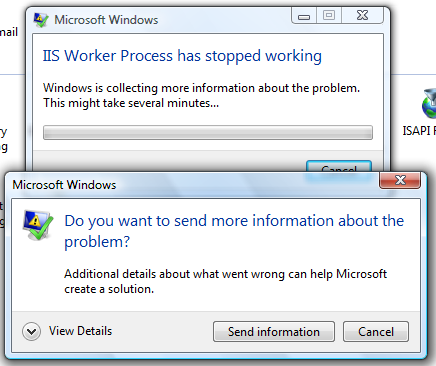
With the new beta release of the MVC framework, I updated BlogSvc to compile and run with the new dlls that are now in the GAC. After deleting from the gac and finally copying the dlls to my bin folder I things running smoothly from within Visual Studio. However, when I deploy to IIS7, I am getting a crash.
I’ve tried cleaning out all the applications in my IIS and also restarted the AppDomains, sites, servers. I’ve also tried rebooting. Anyone have any idea’s? Does the beta run on your IIS7 in Vista?
I’ve asked this question on StackOverflow: Why is Asp.net MVC Beta crashing my IIS7?
Update: I toggled data execution preventions (DEP) and a couple a reboots later and the issue cleared up.
-
Deploy MVC Application
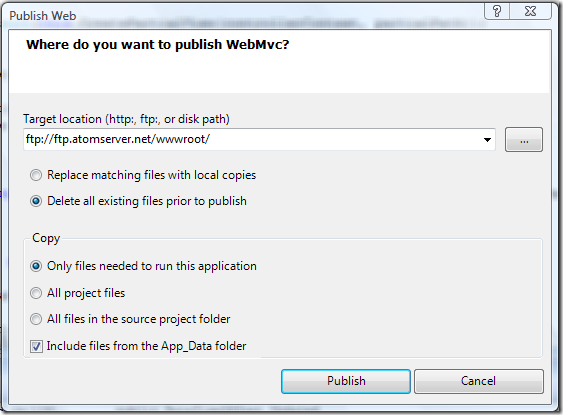
I previously thought Visual Studio.NET only supported automatically deploying “Web Site” projects but it also works with “Web Application” and “MVC” projects. Right-click on your project and choose publish.
After choosing publish it will upload all the files based on your “Copy” choice. You can watch the output window to track the progress:
------ Publish started: Project: WebMvc, Configuration: Debug Any CPU ------

                Connecting to ftp://ftp.atomserver.net/wwwroot/...

                Deleting existing files...

                Publishing folder /...

                Publishing folder App_Data...

                Publishing folder App_Data/www...

                Publishing folder App_Data/www/blog...

                Publishing folder App_Data/www/blog/WelcomeToBlogService06...

                Publishing folder App_Data/www/media...

                Publishing folder App_Data/www/pages...

                Publishing folder js...

                Publishing folder themes...

                Publishing folder themes/default...

                Publishing folder themes/default/images...

                Publishing folder bin...

                ========== Build: 5 succeeded or up-to-date, 0 failed, 0 skipped ==========

                ========== Publish: 1 succeeded, 0 failed, 0 skipped ==========
-
Using the New DateTime Support in .NET 3.5 via MVC & jQuery
I've added New Global Date and Time Support to BlogSvc by utilizing the new expanded support for date times with proper time zone support. Some highlights in the MSDN documentation:
The DateTimeOffset structure represents a date and time value, together with an offset that indicates how much that value differs from UTC. Thus, the value always unambiguously identifies a single point in time. A DateTimeOffset value is not tied to a particular time zone, but can originate from any of a variety of time zones. The TimeZoneInfo class makes it possible to work with dates and times so that any date and time value unambiguously identifies a single point in time. Taking advantage of time zone support in the .NET Framework is possible only if the time zone to which a date and time value belongs is known when that date and time object is instantiated.
So the MSDN documentation is not clear on which class can make a date/time unambiguous. However, the last sentence is the best clue. We must capture both the UTC value and an originating time zone.
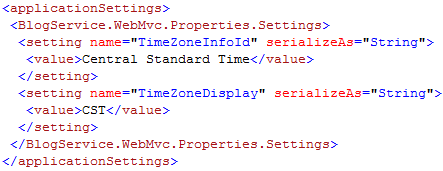
For an ASP.NET MVC application we can add configuration to associate all date/times to our preferred time zone.
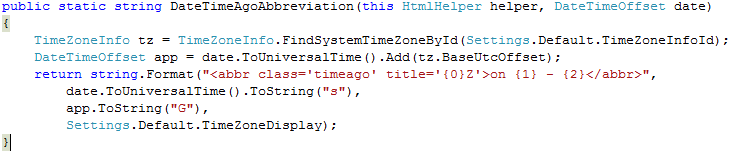
With this configuration, we can now write an HtmlHelper extension to display a DateTimeOffset in our preferred time zone.
Call the extension method and pass it either a DateTimeOffset or a DateTime
.
This will result in the follwing html:
<abbr title='Tuesday, October 07, 2008 10:01 PM (GMT-06:00) Central Time (US & Canada)'>10/7/2008 10:01 PM - CST</abbr>
This gives an abbreviated date/time display at your preferred time zone.
However, you may want to display time relative to the user browsing your website. There are two ways to accomplish this:
- Ask and store each user's time zone
- Automatically determine user's time zone using javascript
The first option is commonly used with forums and requires the user to register and choose their preferred time zone. The second option makes much more sense for content websites (such as a blog) since it can occur automatically without registration.
There is already a great plugin for jQuery that can display fuzzy times that are directly relative to the user. It is called the Time Ago Plugin. To use it, lets create another helper extension that utilizes a micro-format:
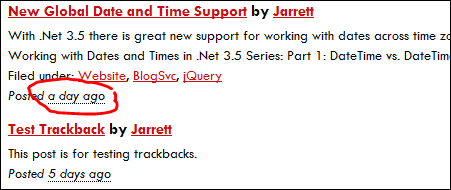
This creates abbreviations in the html, that when activated through jQuery show times that will be automatically updated even after the user has loaded the page.
This DateTime display is much more recognizable and personable to the casual user.
Head on over to the BlogSvc website to download the code.
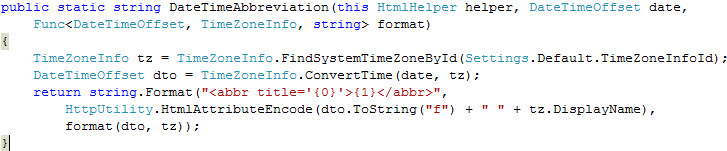
Update: here is a bonus function that will allow you to format the date (with access to the time zone information) anyway you'd like.
Call it like
: