jvance.com

.net, c#, asp.net, linq, htpc, woodworking

Jarrett's Tech Blog - For February 2010

  1. Making an Ajax Form with jQuery in ASP.NET MVC

    The latest release of jQuery 1.4 makes it even easier to create an Ajax form in ASP.NET MVC.  The process involves creating two partial views, one for the form and one for successful post of the form.  Then, we'll create an action method for handling form posts. Finally, we'll wire up the jQuery events to make it post within the page.

    Create the Form Partial View

    First, create a view model to hold the form values.

    public class ContactViewModel
    {
        public string Name { get; set; }
        public string Email { get; set; }
        public string Phone { get; set; }
        public string Message { get; set; }
    }
    

    Next, create a basic HTML form with validation messages as shown below (call it ContactForm.ascx).

    <%@ Control Language="C#" AutoEventWireup="true" Inherits="ViewUserControl<ContactViewModel>" %>
    
    <div id="contact">
      <h4>Send A Message</h4>
      <form method="post" action="<%= Url.Action("SendMessage", "Contact") %>">
        <fieldset>
          <label for="name">Name <small>(required)</small></label><%= Html.ValidationMessage("name") %>
          <%= Html.TextBox("name", Model.Name) %>
    
          <label for="email">Email <small>(required)</small></label><%= Html.ValidationMessage("email") %>      
          <%= Html.TextBox("email", Model.Email) %>
    
          <label for="phone">Phone</label><%= Html.ValidationMessage("phone") %>
          <%= Html.TextBox("phone", Model.Phone) %>
    
          <label for="message">Message <small>(required)</small></label><%= Html.ValidationMessage("message")%>
          <%= Html.TextArea("message", Model.Message, 4, 100, null) %>
          
          <%= Html.ValidationMessage("error") %>
          <input type="submit" value="Send Message" />
        </fieldset>
      </form>
    </div>
    

    Now include this form into any view with Html.RenderPartial("ContactForm", new ContactModel());

    Also create a success partial view (call it ContactSuccess.ascx):

    <%@ Control Language="C#" AutoEventWireup="true" Inherits="ViewUserControl<ContactViewModel>" %>
    <div id="contact">
        <h4>Thank You!</h4>
      <p class="response"><strong>Your message was sent successfully.</strong> We will get back to you as soon as possible.</p>
      <p>
      Name: <%= Model.Name %><br />
      Email: <%= Model.Email %><br />
      Phone: <%= Model.Phone %><br />
      Message: <%= Model.Message %>
      </p>
    </div>
    

    This view will replace the form upon successful form submission.

    Handle SendMessage Action

    Create a new ContactController class and add the following action method:

    [AcceptVerbs(HttpVerbs.Post)]
    public ActionResult SendMessage(ContactViewModel model)
    {
        ValidateContactModel(model);
    
        if (this.ModelState.IsValid)
        {
            try
            {
                // get contact configuration
                SendContactMessage(model);                
                return PartialView("ContactSuccess", model);
            }
            catch (Exception ex)
            {
                //TODO: log/notify error
                ModelState.AddModelError("error", "An unexpected error occured, please contact the webmaster.");
            }
        }
        return PartialView("ContactForm", model);
    }
    

    This code will validate the contents of the form post and then send the message. If there are any errors, it will redisplay the form. Otherwise, it'll display the contact success partial view.

    Note: model validation and sending email is outside the scope of this article, see here for the code.

    Wire jQuery Event for AJAX Form

    Finally, let's add the jQuery code to bottom of the page.  If you'd like, you can put this in a javascript file and link to it.

    $(document).ready(function () {
      $('#contact form').live('submit', function () {
        $.post($(this).attr('action'), $(this).serialize(), function (data) {
          $("#contact").replaceWith($(data));
        });
        return false;
      });
    });
    

    This code uses the updated live event support on form submits to easily wire up the submit button.  The submit button does an AJAX post to the action.  The action will return either the same form (with errors) or the success partial view.  It replaces the current form with the response data.  Since we are using the live event support, we do not have to worry about re-wiring the submit event each time the error form is returned.

    Example Form

    You can see the entire source code in the AtomSite source code.

    Posted by JarrettV on February 20 at 2:07 PM

  2. Android Market Needs Gift Cards

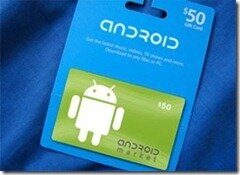
    As of today, the only valid  purchasing method on the Android Market is the use of a credit card. Android needs gift cards to expand access to the Android Market.  If there were gift cards, people could gift apps and more people (especially the young) could buy apps.  I am more likely to buy an app with a gift card than my own credit card. iTunes gift cards are everywhere (literally in almost every store) which increases exposure to Apple's brand.  Google needs this too!

    Expand Access with Gift Cards

    If there were Android gift cards, it would expand access to the market for young people or people that do not have a credit card. Lets face it, kids buy games and there are not many parents that let their kid link their credit card to their phone.  If there were gift cards, parents could buy their kids a gift card or kids could buy a gift card with their own money.

    Also, some people, for whatever reason, may not have a credit card or want to use a credit card on the internet.  These people need an alternative method to buy apps on the market since cash is out of the question.

    Gift Card Culture

    The gift card business has boomed due to what I believe is a gift card culture. I don't know about you, but what do you give to the dad that has everything?  That is easy, get them a gift card to Bass Pro Shops, right? I'll admit, I give gift cards to people because it is easier than trying to pick something out for them.

    Receiving a gift card is never as personal as getting a physical gift, but sometimes it is preferable.  For example, I love technology.  Technology is easy for me to buy because I understand it.  However, it is too complex for my grandmother to gift an SSD to me. So I love it when I get a Newegg, Best Buy, or Amazon gift cards.  Also, I am more likely to make a larger purchase when using a gift card.

    Free Android Brand Advertising

    iTunes gift cards are everywhere. I've seem them at every major retailer, wholesale clubs, grocery stores, drug stores, and gas stations.  Because they are so easy to find and buy they make a perfect last minute gift.  Good advertising is in-your-face-advertising and Apple has succeeded here.

    Google should introduce gift cards to the Android Market as soon as possible.  Let's expand the market!

    More Links
    Payment Methods

    Carrier Billing

    Think of gift cards?

    Think of gift cards (again)?

    Marketplace Suggestions

    Posted by JarrettV on February 13 at 11:05 PM

© Copyright 2010 Powered by AtomSite 1.4.0.0