Deploy MVC Application
Posted in MVC, ASP.NET by Jarrett on 10/15/2008 7:17:59 PM - CSTI previously thought Visual Studio.NET only supported automatically deploying “Web Site” projects but it also works with “Web Application” and “MVC” projects. Right-click on your project and choose publish.
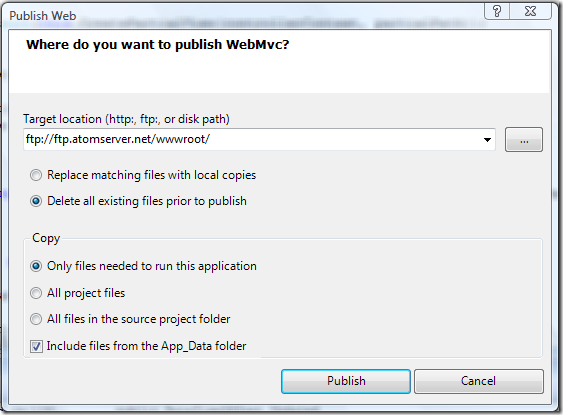
After choosing publish it will upload all the files based on your “Copy” choice. You can watch the output window to track the progress:
------ Publish started: Project: WebMvc, Configuration: Debug Any CPU ------

              Connecting to ftp://ftp.atomserver.net/wwwroot/...

              Deleting existing files...

              Publishing folder /...

              Publishing folder App_Data...

              Publishing folder App_Data/www...

              Publishing folder App_Data/www/blog...

              Publishing folder App_Data/www/blog/WelcomeToBlogService06...

              Publishing folder App_Data/www/media...

              Publishing folder App_Data/www/pages...

              Publishing folder js...

              Publishing folder themes...

              Publishing folder themes/default...

              Publishing folder themes/default/images...

              Publishing folder bin...

              ========== Build: 5 succeeded or up-to-date, 0 failed, 0 skipped ==========

              ========== Publish: 1 succeeded, 0 failed, 0 skipped ==========
Comments
None.